
DSCA ECA Guide Selector
Select the correct ECA guide based on your role and where you are in the process.
Select the correct ECA guide based on your role and where you are in the process.
Use this path if you currently access SCIP with an RSA token and are transitioning to ECA or another approved credential path.
View Transition GuidesUse this path if you are a first-time foreign partner user who needs to begin the ECA onboarding process.
View New User GuidesUse this if you have your voucher and are ready to complete the IdenTrust ECA application steps.
IdenTrust Application GuideUse this if you received a software certificate and need activation or installation guidance.
Software Activation GuideUse this if you received a hardware token or smart card and need activation or installation guidance.
Hardware Activation GuideUse this if your certificate has already been issued and installed and you now need to register in DMDC.
DMDC User GuideUse this if you support foreign partner onboarding, identity verification, voucher requests, and submission steps.
ADE PlaybookUse this if you are responsible for reviewing and approving DMDC Mission Partner sponsorship requests.
DMDC Sponsor GuideUse this form to request an ECA voucher for a foreign national user.
Open Voucher FormUse this if: you are a foreign partner user starting the ECA process, transitioning from RSA token access, or onboarding as a new user.
Open End-User PlaybookUse this if: you have received your voucher and are ready to complete the IdenTrust ECA application process.
Open IdenTrust Application GuideUse this if: your certificate has already been issued and installed and you now need to register in the DMDC Mission Partner Portal.
Open DMDC User GuideUse this if: you received a software certificate and need installation and activation steps.
Open Software Activation GuideUse this if: you received a hardware token or smart card and need installation and activation steps.
Open Hardware Activation GuideUse this if: you are the Authorized DoW Employee supporting foreign partner onboarding, in-person identity verification, voucher handling, and submission steps.
Open ADE PlaybookUse this if: you are responsible for reviewing and approving DMDC Mission Partner sponsorship requests.
Open DMDC Sponsor GuideUse this if: you are requesting an ECA voucher for a foreign national user.
Open Voucher Request Form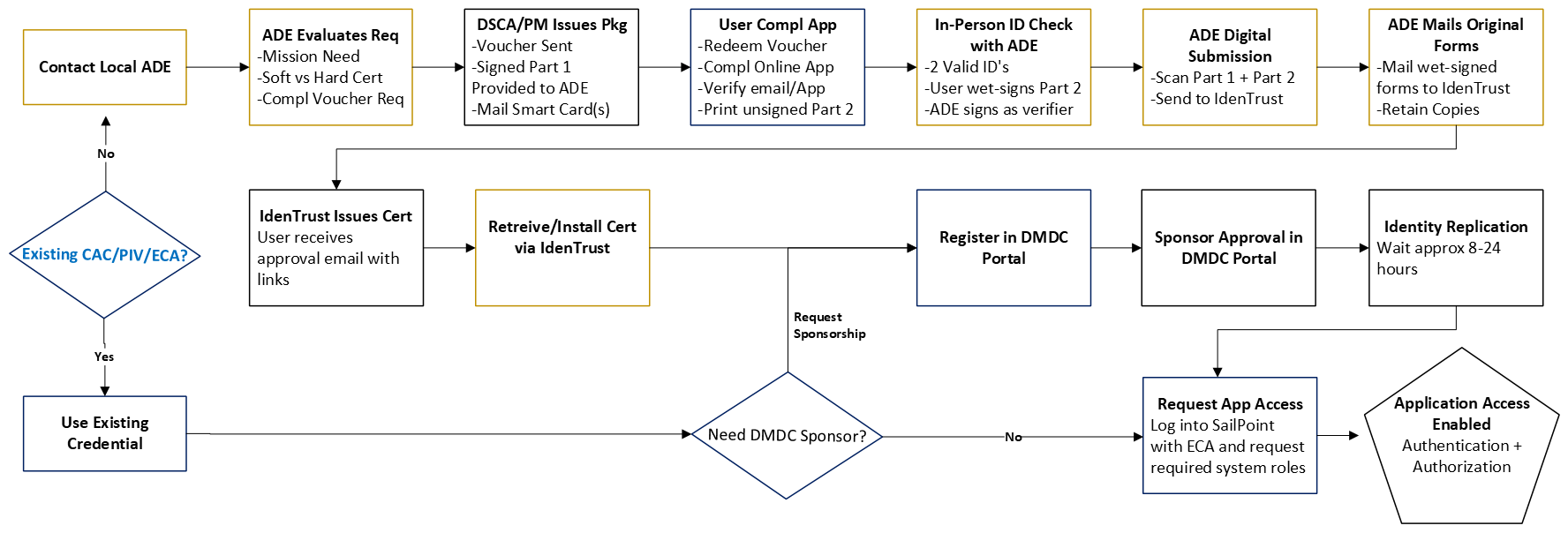
If you are not sure which guide applies to you, begin with the role groupings above: